A website is a collection of related web pages that are stored on a server and can be accessed through the internet using a web browser. It provides information, services, or content for individuals, businesses, organizations, or anyone looking for information online.
Nowadays, almost everything we do online starts with a website. Whether you’re shopping, reading the news, watching videos, learning something new, or booking tickets, you’re using a website. That’s why websites have become an important part of our everyday lives.
For businesses, a website is their online presence. It helps them share information, connect with customers, and grow their brand. From small local businesses to large companies, a website is often the first step toward success online.
But what exactly is a website, and how does it work? In this guide, you’ll learn the basics of websites, their different types, how they work, and why they are so important in today’s digital world. By the end, you’ll have a clear understanding of what a website is and why it matters.

What Is a Website?
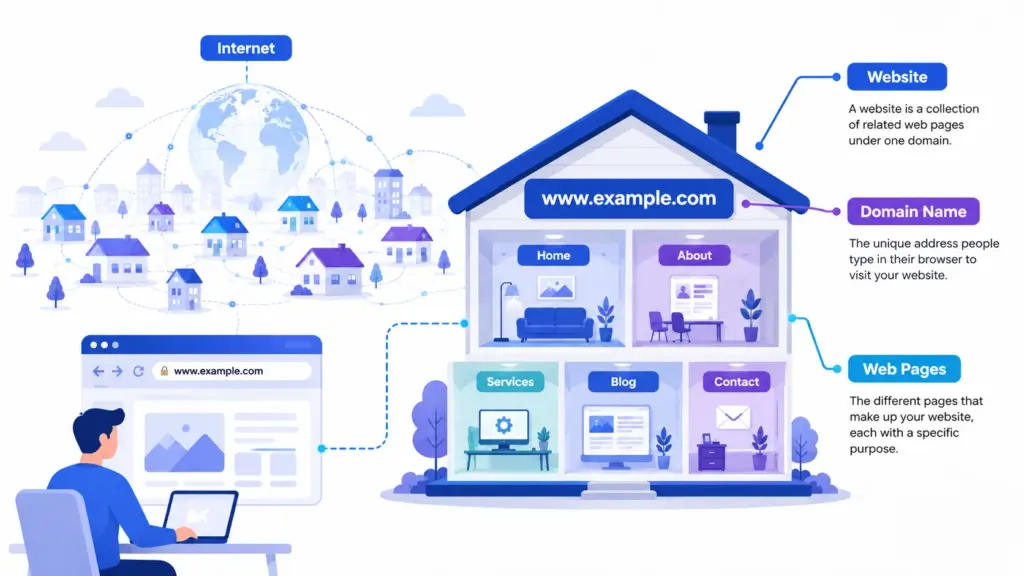
A website is a collection of web pages that are connected together and available on the internet. People can visit a website using a web browser like Chrome, Edge, Firefox, or Safari. Every website has its own unique address, called a domain name, such as example.com.
The easiest way to understand a website is to compare it to a house. Think of the internet as a huge city. In that city, every house has its own address. A website is like one of those houses, and the domain name is its address. Inside the house, each room is like a different web page. For example, the Home page welcomes visitors, the About page shares information, and the Contact page helps people get in touch.
You use websites every day without even thinking about it. Google helps you search for information, YouTube lets you watch videos, Amazon allows you to shop online, and Wikipedia provides knowledge on almost every topic. These are all examples of websites that make life easier and help people find information, connect with others, learn new things, or buy products and services.
Website vs Webpage
Many beginners think a website and a webpage are the same thing, but they are different. Understanding this difference will help you learn how the internet works.
A website is a complete collection of related web pages under one domain name. It usually includes multiple pages, such as the Home page, About page, Services page, Blog page, and Contact page. All of these pages work together to provide information or services.
A webpage, on the other hand, is a single page within a website. Every webpage has its own unique URL and contains specific information. For example, if you read a blog article, you are viewing one webpage, not the entire website.
Think of a website as a book and a webpage as one page of that book. The book contains many pages, while each page has its own content.
Website vs Webpage
| Website | Webpage |
|---|---|
| A collection of many web pages | A single page on a website |
| Has one main domain name | Has its own unique URL |
| Contains different sections and pages | Contains specific information |
| Can have hundreds or thousands of pages | Only one page at a time |
Example: www.amazon.com | Example: www.amazon.com/cart |
Examples
- Website: Amazon, Wikipedia, YouTube, BBC News
- Webpages: Amazon’s Product Page, Wikipedia’s “Earth” article, a YouTube video page, or a BBC News article page.
In simple words, a website is made up of many webpages, and each webpage has a specific purpose. When you visit a website, you move from one webpage to another by clicking links or using the navigation menu.
Types of Websites
There are many different types of websites, and each one is created for a specific purpose. Some websites help businesses attract customers, while others are designed for learning, shopping, entertainment, or sharing information. Below are the most common types of websites you will find on the internet.
Business Websites
A business website represents a company or organization online. It provides information about products, services, contact details, business hours, and customer support. The main goal is to build trust and attract new customers.
Example: A local restaurant, law firm, or digital marketing agency website.
Blogs
A blog is a website where individuals or businesses regularly publish articles, tutorials, opinions, or news. Blogs help educate readers, share experiences, and improve search engine visibility through fresh content.
Example: Travel blogs, food blogs, technology blogs, and personal blogs.
Ecommerce Websites
An ecommerce website allows people to buy and sell products or services online. Customers can browse products, add them to a shopping cart, make secure payments, and place orders without visiting a physical store.
Example: Amazon, eBay, or an online clothing store.
Portfolio Websites
Portfolio websites showcase a person’s work, skills, and achievements. They are commonly used by freelancers, designers, photographers, developers, writers, and artists to attract clients or employers.
Example: A graphic designer displaying logos and branding projects.
Educational Websites
Educational websites provide learning resources such as online courses, study materials, quizzes, tutorials, and videos. They help students and professionals improve their knowledge and skills.
Example: School websites, online learning platforms, and coding tutorial websites.
Government Websites
Government websites share official information, public services, forms, announcements, laws, and policies. They help citizens access important services safely and quickly.
Example: Tax filing, passport applications, or municipal service websites.
Social Media Websites
Social media websites allow people to connect, communicate, and share photos, videos, messages, and ideas with others around the world.
Example: Facebook, Instagram, LinkedIn, and X (formerly Twitter).
Forums
Forum websites are online communities where users ask questions, share knowledge, and discuss topics with other members. Conversations are organized into categories and discussion threads.
Example: Programming forums, gaming communities, or hobby discussion boards.
News Websites
News websites publish the latest local and international news, sports updates, business reports, technology stories, and entertainment articles. Their content is updated frequently throughout the day.
Example: BBC News, CNN, and local newspaper websites.
Membership Websites
Membership websites provide exclusive content or services to registered users. Some are free, while others require a monthly or yearly subscription to access premium resources.
Example: Online learning memberships, fitness programs, premium communities, and paid newsletters.
Comparison Table
| Website Type | Main Purpose | Example |
|---|---|---|
| Business | Promote a company and its services | Company website |
| Blog | Share articles and information | Travel or food blog |
| Ecommerce | Sell products online | Online store |
| Portfolio | Showcase work and skills | Designer portfolio |
| Educational | Provide learning resources | Online course website |
| Government | Offer public services and official information | Government portal |
| Social Media | Connect and share with others | Social networking platform |
| Forum | Community discussions and questions | Discussion board |
| News | Publish current events and updates | News portal |
| Membership | Offer exclusive content to members | Subscription-based learning site |
Choosing the right type of website depends on your goals. Whether you want to start a business, sell products, share knowledge, build a personal brand, or create an online community, there is a website type designed to meet your needs.
Static vs Dynamic Websites
Websites can be divided into two main types: static websites and dynamic websites. The biggest difference is how their content is created and updated.
A static website displays the same content to every visitor. Each webpage is created using HTML and CSS, and the content only changes when someone manually edits the website files. Static websites are fast, secure, and easy to host, making them ideal for simple websites.
A dynamic website generates content in real time. It uses programming languages and databases to display different information based on the user, location, or actions. Most modern websites, including online stores, blogs, and social media platforms, are dynamic because their content changes frequently.
Static vs Dynamic Website Comparison
| Feature | Static Website | Dynamic Website |
|---|---|---|
| Content | Fixed | Changes automatically |
| Database | Not required | Required |
| Speed | Very fast | Slightly slower |
| Updates | Manual | Easy through CMS or database |
| Development | Simple | More complex |
| Best For | Small websites | Large, interactive websites |
Pros
Static Website
- Fast loading speed
- Better security
- Lower hosting costs
- Easy to build for small projects
Dynamic Website
- Easy to update content
- Supports user accounts and logins
- Interactive and personalized experience
- Perfect for growing websites
Cons
Static Website
- Manual updates for every page
- Limited interactive features
- Not suitable for large websites
Dynamic Website
- More complex to develop
- Higher hosting and maintenance costs
- Requires regular security updates
Common Use Cases
| Static Website | Dynamic Website |
|---|---|
| Personal portfolio | Ecommerce stores |
| Landing pages | Blogs |
| Company brochure websites | News websites |
| Event websites | Social media platforms |
| Documentation sites | Membership websites |
In simple words, choose a static website if you need a fast and simple online presence with very few updates. Choose a dynamic website if your website needs regular content updates, user interaction, online shopping, or advanced features.